Network Architecture - Planning before executing!
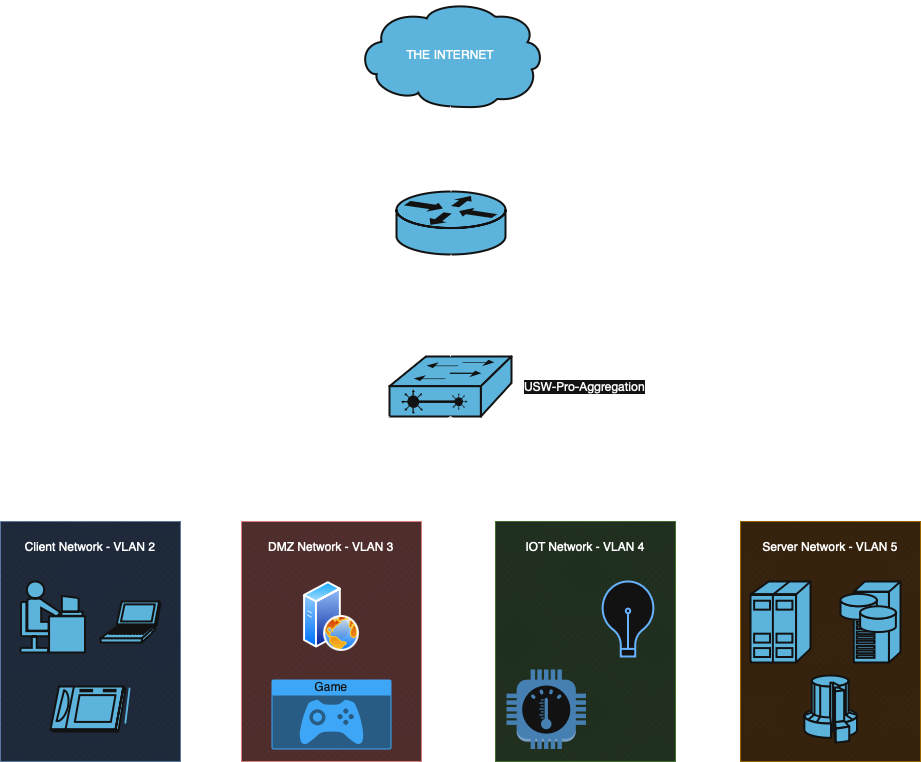
❓ ROAS - What’s that?
A Router on a Stick (ROAS) is a network configuration where a single physical router interface is used to route traffic between multiple VLANs (Virtual Local Area Networks) on a switch. This is achieved by configuring the router interface as a trunk port and creating sub-interfaces, each assigned to a different VLAN. This is a great setup for a home network or SMB (Small to Medium Business) network.
How it works:
- The switch has multiple VLANs configured.
- The router connects to the switch with one physical cable.
- The router’s interface is divided into logical sub-interfaces, each tagged for a specific VLAN.
- The router routes traffic between VLANs, allowing devices in different VLANs to communicate.
🖥️ Hardware
So let’s talk hardware real quick! I am a compute engineer by trade, and I like my networking to be drop-dead simple. Enter Unifi. I’m not going to go on and on about the benefits of Unifi since there are plenty of others who are more qualified to do so. It’s simple, reliable, and doesn’t have recurring subscriptions or licensing fees — that’s why I use it. Use what you like and what works best for you. I find that a Unifi stack is equal to a pfSense and MikroTik stack, so go with whichever you like more.
Whichever stack you choose, I highly recommend getting 10G interfaces. You’ll find that 1G is not quite enough for most homelab traffic, especially for VM migrations. 2.5G and 5G are great options as well, but are typically more expensive since the technology is newer.
So what should I put in a VLAN?
Well… anything you want! It’s really up to you how to divide your network, but I put some recommendations below. You can see my diagram above as well.
- IOT Network – Very useful to separate out your Internet of Things devices that may not be the most up to date on their software patches.
- Camera Network – Similar to the IOT network, this network lets you separate out your camera traffic from all your other traffic, and you can drop an NVR (Network Video Recorder) on it as well.
- Server Network – Having a separate network for your servers is helpful since you will probably be sharing your client network with anyone who visits.
- Storage Network – This is really only beneficial if you plan to use iSCSI for storage. iSCSI traffic can clog your network if you don’t have the throughput for it.
Conclusion
So that’s a quick breakdown of a ROAS and how to carve up your network for your homelab! Keep in mind that a lot of your performance between will be dependent on your router’s inter-vlan routing capacity.