2025 Rack Tour!
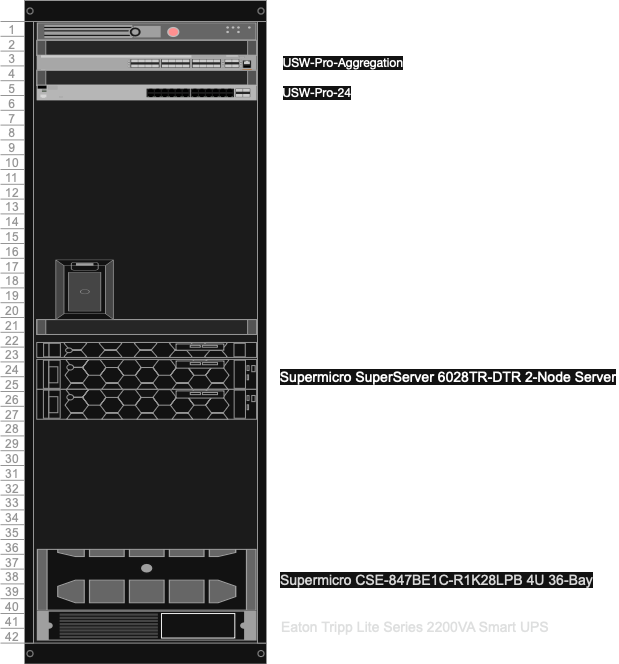
No affiliate links present!
📦 What’s inside that box?
While you definitely don’t need to have a rack in your garage, basement, or even bedroom (some people do this — I’m not sure why), it feels great to have a piece of professional computing equipment that’s all tidied up and looks straight out of a data center. Plus it gives me a good feeling to reuse some hardware instead of it immediately going to a landfill the minute it is decommissioned. So, let’s run down the hardware from top to bottom!
🖥️ The hardware
It’s all kept inside an APC 42U cabinet that I acquired from a company that no longer needed it. I really like the look of a full cabinet, but is probably overkill for most people.
Networking
Ubiquiti UDM‑SE
This is my router and firewall. It is responsible for protecting my network from the internet as well as providing inter‑VLAN routing. It’s also a Cloud Key, so it can control all my other Unifi devices. Unifi Network version 9 is an amazing upgrade from version 8 and allows me to see all my networking devices in one place. It also provides insights into connectivity and performance issues.
🔧 Hardware
- Port Layout:
- 8x 1 GbE RJ45 (1G/100M/10M)
- 1x 2.5 GbE RJ45 (2.5G/1G/100M/10M)
- 2x 10G SFP+ (10G/1G)
- IDS/IPS Throughput: 3.5 Gbps
Ubiquiti USW‑Pro‑Aggregation
This is my core switch (or spine). I don’t technically have a spine‑and‑leaf topology, but hey — it’s a homelab 🤷♂️. It’s a rock‑solid switch that holds all my SFP+ 10G connections. It’s also nice to have those 25G ports for hyperconverged setups or blazing‑fast backups.
🔧 Hardware
- Port Layout:
- 4x 25G SFP28
- 28x 10G SFP+
- Switching Capacity: 760 Gbps
- Total Non‑Blocking Throughput: 380 Gbps
- Forwarding Rate: 565 Mpps
Ubiquiti USW‑Pro‑24
This is my leaf switch for all base‑T connections. If it’s a management interface or an out‑of‑band IPMI, it’s connected here. Not the flashiest piece of hardware, but it does its job reliably.
🔧 Hardware
- Port Layout:
- 24x 1 GbE RJ45 (1G/100M/10M)
- 2x 10G SFP+
- Switching Capacity: 88 Gbps
- Total Non‑Blocking Throughput: 44 Gbps
- Forwarding Rate: 65 Mpps
Compute
TerraMaster F4‑424 Max
This is my second backup server. I use ZFS replication to back up my most important files from my primary storage. I love this machine — it’s compact, quiet, and has an impressive CPU. I’m definitely not using it to its max in any way. My only complaint is that TOS isn’t great. It’s getting better and better, but it can’t compete with TrueNAS or Unraid. Mine has 2x NVMe for the TrueNAS OS and 4x 16 TB HDDs.
🔧 Hardware
- CPU: Intel Core i5‑1235U (10 cores / 12 threads, up to 4.4 GHz) with Integrated Iris Xe Graphics
- Memory: 32 GB of DDR5‑5600
- Storage Bays:
- 4x 16 TB HDDs
- 2x 512 GB NVMe
- Networking: Dual 10 GbE RJ‑45
- USB Ports: Two USB‑A and one USB‑C (Gen 2, 10 Gbps) for external drives or accessories
👎 Downsides
- There are only 4 drive bays!
Dell PowerEdge R440
This is my bare‑metal Docker host running Ubuntu 24.04. I like to keep it simple and clean since its primary purpose is to run Docker containers — nothing else.
🔧 Hardware
- Chassis: 1U, dual‑socket rack server
- CPU: Dual Intel Xeon Gold 6138
- Memory: 256 GB of ECC DDR4
- Storage: 4× 2.5″ 400 GB SAS SSDs
- Networking:
- 2× 1 GbE RJ‑45
- 2× SFP28 via ConnectX‑4
- OOB IPMI
👎 Downsides
- It’s only 1U, so expansion room for PCIe cards is limited.
- It can be loud, although after tuning the fan curves, it’s pretty quiet for a 1U server.
Supermicro SuperServer 6028TR‑DTR 2‑Node Server
These are my test servers that I run a variety of software on bare metal before promoting it to production. Currently, they’re being used as OSNexus hosts for trying out the community edition.
🔧 Hardware
- Chassis: 2U, dual‑socket dual‑node rack server
- CPU: Dual Intel Xeon E5‑2680 v4
- Memory: 128 GB of ECC DDR4
- Storage: 6× 2.5″ 400 GB SAS SSDs
- Networking:
- 2× 1 GbE RJ‑45
- 2× 10G SFP+
- OOB IPMI
👎 Downsides
- It has a SATA backplane instead of a SAS one. This normally isn’t a big deal unless you want to run HA storage software.
- Only has 8× electrical PCIe slots (16× physical), which can be limiting.
Supermicro SuperServer 6028U‑TR4T+ 12‑Bay LFF
This is my primary Proxmox host, where I run all my workloads.
🔧 Hardware
- Chassis: 2U, dual‑socket rack server
- CPU: Dual Intel Xeon E5‑2680 v4
- Memory: 512 GB of ECC DDR4
- Storage: 12× 2.5″ 400 GB SAS SSDs
- Networking:
- 4× 10 GbE RJ‑45
- 2× 25G SFP28
- OOB IPMI
👎 Downsides
- The E5‑2680 v4s are rock‑solid, but long in the tooth by today’s standards. I’m looking to upgrade to Xeon Scalable Gen 1 or 2 in the near future.
Supermicro CSE‑847BE1C‑R1K28LPB 4U 36‑Bay
This is my primary storage server, running TrueNAS Community Edition. It’s got almost 192 TB of SAS flash and rips through anything I throw at it.
🔧 Hardware
- Chassis: 4U, single‑socket rack server
- CPU: AMD Epyc 7302P (16 cores / 32 threads)
- Memory: 256 GB of ECC DDR4
- Storage: 36× 2.5″ 7.68 TB SAS SSDs
- Networking:
- 2× 1 GbE RJ‑45
- 2× 25G SFP28
- OOB IPMI
👎 Downsides
- It’s a chonker — heavy even when empty.
Power
Eaton Tripp Lite Series 2200VA Smart UPS
Arguably the most important piece of equipment in any homelab — Power! This 2200 VA unit gives me roughly 1950 W of usable load, which is great considering my circuit only supports roughly 1980 W practically (80% rule).
🔧 Hardware
- 2.2 kVA / 2200 VA / 1920 W line‑interactive 2U rack‑mount UPS, Pure Sine Wave
- 120 V output, Corrects brownouts and over‑voltages from 83 V to 145 V
- 0.9 Power Factor, Interactive LCD interface
- NEMA 5‑20P input, 4 NEMA 5‑15R & 4 NEMA 5‑15/20R outlets
- USB, RS‑232, EPO, and slot for Network Card options